I've been working on an iOS app called Kanbox lately. This post covers where things stand right now, with a few actual exported share images, and I'll write about the development process later.
The reason for building it isn't complicated: Xiaohongshu posts, Douban movies, Xiaoyuzhou podcasts, and GitHub projects all have their own save buttons, but to find something you saved before, you first have to remember where it came from. I wanted to put all these links in one place, and jot down why I saved them while I'm at it.
Get the content in first
Right now you can collect links from the system share sheet, the clipboard, in-app adding, and Shortcuts. Whatever title, author, body text, and images can be parsed get saved along with the original link.
This batch includes a recipe, a set of Istanbul photos, two movies, two podcast episodes, and two projects, Coralbay-Rules and Nodus. These are all real links, and the share images below use this same batch.
The home screen also has a two-column grid and a gallery layout. Use the single column when you want to read text, and switch to another arrangement when you're looking for images. You don't have to sort your saves right away; you can add tags and notes later.

Kanbox-01 flow diagram: collect first, organize later
You don't need to finish categorizing at save time. Keep the original link, save whatever content can be parsed, then add tags and your own notes. If one platform fails, that doesn't mean you have to throw the link away.
Turning saves into share images
Share images come in three layouts: detail card, nine-grid, and waterfall collage. You can also adjust the color scheme and text style. Author, body text, media, date, tags, and QR code can each be toggled on or off, and frequently used settings can be saved as a default style.
The eight finished images below all use the original aspect ratio. Long content can show the full body text or a summary; before exporting, you can also edit the copy for this particular share without writing it back to the original save. If the content is too long, you can split it across multiple images.
Previews in the body text are scaled down proportionally; click the link below an image to see it at full resolution.
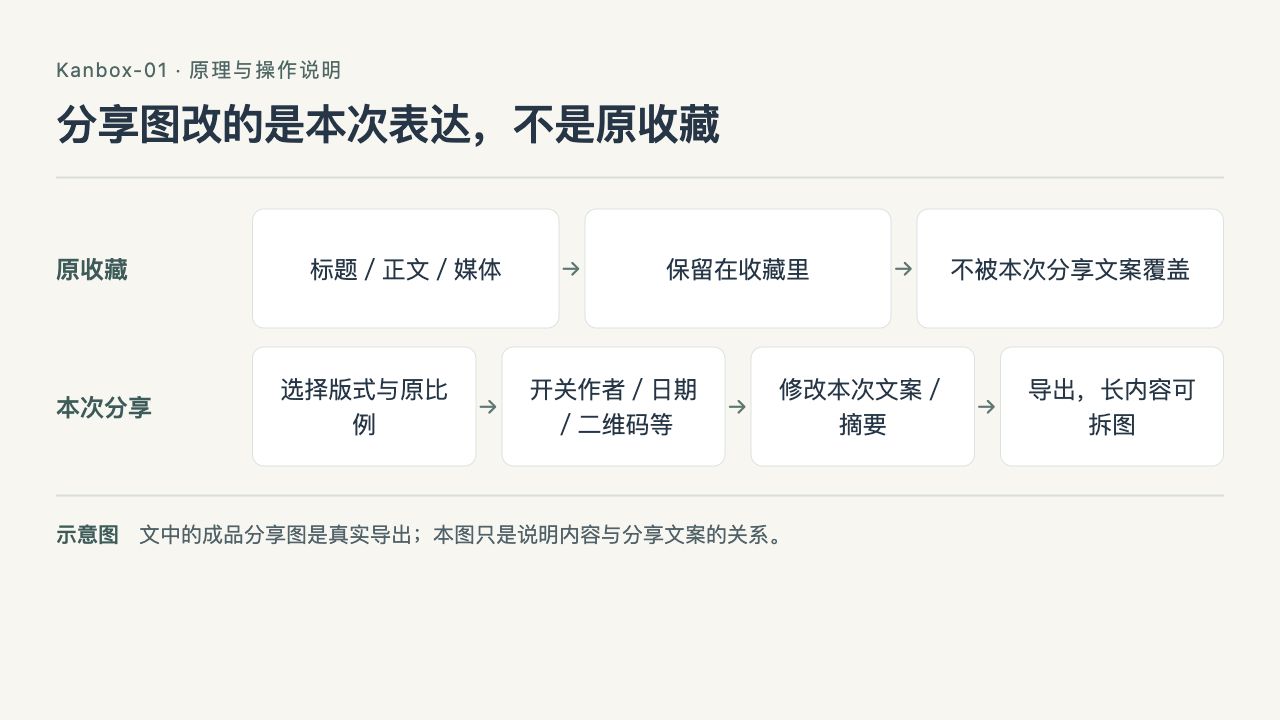
Kanbox-01 flow diagram: share images change this share's expression, not the original save
Share images have their own layout and copy. After adjusting fields, summary, and this share's text, exporting won't write those changes back to the original save; long content can also be split across multiple images.
Posts, movies, podcasts, and projects
Xiaohongshu: recipes and photography
This recipe from 日食记 is a video note. The share image shows the parsed cover and text; the video still has to be watched in the corresponding player or the original post.

Share image for the 日食记 recipe
This set of Istanbul photos by 末梢和神经 actually pulled in 11 images. In the app you can open and zoom each one, while the detail card below puts the whole set together.

Share image for the Istanbul photography set, with 11 images
Douban: movie data
Douban movies use a separate detail layout. Rating, original title, region, genre, release date, and runtime come first, followed by the poster, cast and crew, and synopsis.
This time I imported 3 Idiots and Lock, Stock and Two Smoking Barrels. The two share images keep the movie data and the original-ratio posters, with the synopsis shown as a summary. The rating and number of ratings are the data as of when they were fetched, and may change later.

Share image for 3 Idiots

Share image for Lock, Stock and Two Smoking Barrels
Xiaoyuzhou: a specific episode
Podcasts save the episode link, so you can see the episode title, cover, and description, and there's a usable online audio entry point. Playback needs a network connection; saving something doesn't mean the full episode audio has been downloaded.
The two episodes here are Photo Reason in conversation with photographer Yan Jialin and the conversation between Lu Yu and Ma Yili on 岩中花述. The share images show the cover and a summary of the description; playback opens in the app or on the original platform.

Share image for this Photo Reason episode

Share image for this 岩中花述 episode
GitHub: keep a project intro
For GitHub repos, it tries to read the author, project description, topic tags, and README. This time I used two of my own projects: Coralbay-Rules, which does subscription conversion and routing rules, and Nodus, a web admin panel for frpc.
The full README stays in the save; the short share image only shows the description and part of the content. Repo stats are likewise the state at fetch time.

Share image for Coralbay-Rules

Share image for Nodus
How to find things after saving
Stars can mark important items first, and tags are for categorizing; the home screen's source, type, and time filters are good for narrowing things down. Search looks through your own saves and authors.
For example, searching "Istanbul" turns up that photography save and its author, and keywords in the body text get highlighted too.
Inspiration collections organize content with an ordered set of tags. Notes can be written on their own or attached to a save, adding a reason for saving, a thought, or a timestamp in a podcast you want to come back to. Random review and widgets offer two other ways to browse old saves.

Kanbox-01 flow diagram: whatever you remember, find it from the matching entry point
Search, filters, and review start from different places: if you have a keyword, search; if you only remember the source or time, filter; if you have no target, browse randomly. Tags and notes add the clues you'll need when you look for it later.
Where things stand
Kanbox is still in development. The UI uses SwiftUI, local data uses SwiftData, the minimum OS version is iOS 18, and it targets iPhone and iPad. The system share extension, Shortcuts, and widgets are already in place.
There are still some limitations: platform redesigns, login restrictions, and expired media URLs can affect parsing; when that happens, the original link and description are kept. CloudKit is integrated, but cross-device sync still needs full verification. ZIP backups save saves, notes, collection metadata, and local note images, but don't include all remote videos, audio, and images.

Kanbox-01 flow diagram: what saves, backups, and remote media each keep
Saving a link isn't the same as downloading a full copy of the remote file. ZIP mainly backs up local data like saves and notes; and having CloudKit integrated doesn't mean I can write it up as fully verified cross-device sync ahead of time.
This post documents the development state as of October 2, 2026, and there's no download link yet. Part 2 continues with link parsing: how data is fetched from different platforms, and what happens when it fails.
The eight share images in this post were generated by Kanbox after actually importing public links; previews are scaled down proportionally, and the full files are stored on the blog's OSS. Third-party text, photography, posters, covers, and logos belong to their respective rights holders; sources are linked in the text.