Here is a self-use Docker project list, with some configurations referencing the Deployment Summary. The maintenance status and versions of different projects vary greatly, and it cannot be guaranteed that all examples will run directly in 2026.
The list distinguishes two types of configurations: entries marked as "documentation verification" reference the current project description; other entries are historical configurations, clearly marked as pending retesting. Images, credentials, ports, and initialization methods all need to be confirmed before deployment. None of these containers were started, and no databases were migrated.
Host ports with the same name across different projects will conflict. Each section below is an independent project; do not combine the entire document into a single Compose file. latest is only an example choice; in practice, verify the release and architecture, pin verified versions, and retain backups and rollback conditions.
Common parameters
Compose V2 uses docker compose. The top-level version is outdated, and this document's configurations no longer include it. restart: "no" does not restart automatically; on-failure restarts only on failure; always and unless-stopped differ in behavior when restarting the daemon after a manual stop. A restart policy is not the same as a health check, and it does not guarantee the application is already able to serve externally.
On the left side of a port is the host entry point, and on the right is the container listening port. Publishing without an address by default usually binds to all interfaces; the ordinary web service examples in this document are changed to 127.0.0.1, and access from another machine requires separately configuring a trusted LAN, SSH forwarding, or an authenticated reverse proxy. DNS, hardware, and host-network services cannot have this rule applied blindly.

Illustration: Docker ports and volumes: do not mix up left and right
Databases, configurations, and uploaded files must be persisted; mounted directories, user permissions, and data backups are part of deployment. .env is only meant to avoid hardcoding values into the article; it is not an encrypted safe and must not be committed to a public repository.
docker compose config --quiet
docker compose up -d
docker compose logs --tail=100
Passing a syntax check does not mean the image exists, the application is configured correctly, or the data can be migrated. These deployment commands were not actually executed here.
Cloudflare bypass tool flaresolverr
Historical configuration, not yet retested on a real machine against the current image. For image tags, application configuration, volume paths, and first-time initialization, refer to the maintainer's current documentation; the following cannot be treated as a verified new deployment solution.
services:
  flaresolverr:
    image: ghcr.io/flaresolverr/flaresolverr:latest
    container_name: flaresolverr
    environment:
    - LOG_LEVEL=info
    - TZ=Asia/Shanghai
    ports:
    - 127.0.0.1:8191:8191
    restart: unless-stopped
Mind map mind-map
Historical configuration, not yet retested on a real machine against the current image. For image tags, application configuration, volume paths, and first-time initialization, refer to the maintainer's current documentation; the following cannot be treated as a verified new deployment solution.
services:
  mindmap:
    container_name: mindmap
    image: shuiche/mind-map
    ports:
    - 127.0.0.1:6679:8080
    environment:
      TZ: Asia/Shanghai
    restart: always
Xiaoya Alibaba resources
Historical configuration, not yet retested on a real machine against the current image. For image tags, application configuration, volume paths, and first-time initialization, refer to the maintainer's current documentation; the following cannot be treated as a verified new deployment solution.
services:
  xiaoya:
    container_name: xiaoya
    image: xiaoyaliu/alist
    ports:
    - 127.0.0.1:3579:80
    volumes:
    - /home/zsg/docker/xiaoya:/data
    - /home/zsg/docker/xiaoya/alist:/opt/alist/data
    environment:
      TZ: Asia/Shanghai
    restart: always
Snapdrop web file transfer
Historical configuration, not yet retested on a real machine against the current image. For image tags, application configuration, volume paths, and first-time initialization, refer to the maintainer's current documentation; the following cannot be treated as a verified new deployment solution.
services:
  snapdrop:
    image: lscr.io/linuxserver/snapdrop:latest
    container_name: snapdrop
    environment:
    - TZ=Asia/Shanghai
    volumes:
    - /home/zsg/docker/snapdrop:/config
    ports:
    - 127.0.0.1:7635:80
    restart: unless-stopped
web-check website testing
Historical configuration, not yet retested on a real machine against the current image. For image tags, application configuration, volume paths, and first-time initialization, refer to the maintainer's current documentation; the following cannot be treated as a verified new deployment solution.
services:
  webcheck:
    container_name: webcheck
    restart: unless-stopped
    image: lissy93/web-check
    ports:
    - 127.0.0.1:3084:3000
    environment:
    - TZ=Asia/Shanghai
Xunlei
Historical configuration, not yet retested on a real machine against the current image. For image tags, application configuration, volume paths, and first-time initialization, refer to the maintainer's current documentation; the following cannot be treated as a verified new deployment solution.
This item involves host networking, devices, or high-privilege mounts. Evaluate it only in a necessary and trusted environment; do not treat the container as absolutely isolated; Docker socket permissions are especially sensitive.
services:
  xunlei:
    image: cnk3x/xunlei:latest
    privileged: true
    container_name: xunlei
    hostname: nas
    network_mode: host
    environment:
    - XL_WEB_PORT=4321
    - XL_BA_USER=user
    - XL_BA_PASSWORD=${XL_BA_PASSWORD:?set XL_BA_PASSWORD in a private .env file}
    volumes:
    - /home/zsg/docker/xunlei/data:/xunlei/data
    - /home/zsg/docker/xunlei/downloads:/xunlei/downloads
    restart: unless-stopped
Fail2ban
Historical configuration, not yet retested on a real machine against the current image. For image tags, application configuration, volume paths, and first-time initialization, refer to the maintainer's current documentation; the following cannot be treated as a verified new deployment solution.
This item involves host networking, devices, or high-privilege mounts. Evaluate it only in a necessary and trusted environment; do not treat the container as absolutely isolated; Docker socket permissions are especially sensitive.
services:
  fail2ban:
    container_name: fail2ban
    restart: 'no'
    network_mode: host
    volumes:
    - /home/zsg/docker/fail2ban/data:/data
    - /var/log:/var/log:ro
    image: crazymax/fail2ban:latest
    environment:
    - TZ=Asia/Shanghai
    - F2B_LOG_TARGET=STDOUT
    - F2B_LOG_LEVEL=INFO
    - F2B_DB_PURGE_AGE=1d
    cap_add:
    - NET_ADMIN
    - NET_RAW
Synology DSM
Historical configuration, not yet retested on a real machine against the current image. For image tags, application configuration, volume paths, and first-time initialization, refer to the maintainer's current documentation; the following cannot be treated as a verified new deployment solution.
This item involves host networking, devices, or high-privilege mounts. Evaluate it only in a necessary and trusted environment; do not treat the container as absolutely isolated; Docker socket permissions are especially sensitive.
docker network create -d macvlan \
     --subnet=10.0.0.0/24 \
     --gateway=10.0.0.1 \
     --ip-range=10.0.0.160/28 \
     -o parent=eth0 vdsm
 # 先建立macvlan网络,eth0要改成你的网卡地址
 # 以上按照你的局域网ip改
services:
  synology-dsm:
    container_name: dsm
    restart: always
    environment:
      TZ: Asia/Shanghai
      CPU_CORES: '2'
      RAM_SIZE: 1024M
      DISK_SIZE: 16G
      ALLOCATE: N
      DHCP: Y
    devices:
    - /dev/kvm
    - /dev/vhost-net
    device_cgroup_rules:
    - c *:* rwm
    cap_add:
    - NET_ADMIN
    ports:
    - 127.0.0.1:5000:5000
    volumes:
    - /home/zsg/docker/dsm:/storage
    stop_grace_period: 1m
    image: kroese/virtual-dsm:latest
    networks:
      vdsm:
        ipv4_address: 10.0.0.160
networks:
  vdsm:
    external: true
Single Sign-On Authelia
Historical configuration, not yet retested on a real machine against the current image. For image tags, application configuration, volume paths, and first-time initialization, refer to the maintainer's current documentation; the following cannot be treated as a verified new deployment solution.
Compose is only the container structure; it does not include complete authentication, TLS, routing, or business configuration. Before initialization and access control are complete, do not expose the entry point to untrusted networks.
services:
  authelia:
    container_name: authelia
    image: authelia/authelia:latest
    restart: unless-stopped
    ports:
    - 127.0.0.1:19091:9091
    environment:
    - TZ=Asia/Shanghai
    volumes:
    - /home/zsg/docker/authelia/config:/config
Intranet Penetration FRP
frps is on the public network, frpc is on the internal network. Do not mix third-party images, old INI, and paths from different versions. For the complete configuration matching version, port, authentication, and TLS, see the site's "Frp Setup and Configuration". Reference: Official Project. Do not directly expose the router management entry.
RustDesk Remote Desktop
Historical configuration, not yet retested on a real machine against the current image. For image tags, application configuration, volume paths, and first-time initialization, refer to the maintainer's current documentation; the following cannot be treated as a verified new deployment solution.
The remote desktop client needs to reach the corresponding TCP/UDP ports and cannot be replaced by an ordinary HTTP reverse proxy; this item retains the historical port structure, and before deployment you still need to verify the server key, data sharing, and network restrictions against upstream. Do not expose an unconfigured remote control entry point to untrusted networks.
services:
  hbbs:
    container_name: rustdesk-hbbs
    ports:
    - 21115:21115
    - 21116:21116
    - 21116:21116/udp
    - 21118:21118
    image: rustdesk/rustdesk-server
    command: hbbs
    volumes:
    - /home/zsg/docker/rustdesk/hbbs:/root
    restart: always
  hbbr:
    container_name: rustdesk-hbbr
    ports:
    - 21117:21117
    - 21119:21119
    image: rustdesk/rustdesk-server
    command: hbbr
    volumes:
    - /home/zsg/docker/rustdesk/hbbr:/root
    restart: always
Stirling PDF Toolbox
The current official documentation uses the following image and data paths. The old frooodle/s-pdf configuration is no longer used as a new deployment example:
services:
  stirling-pdf:
    image: docker.stirlingpdf.com/stirlingtools/stirling-pdf:latest
    restart: unless-stopped
    ports:
      - "127.0.0.1:8080:8080"
    volumes:
      - ./stirling-data:/configs
First complete initialization and account setup at a controlled entry point; do not disable login and directly expose it to the public internet. Continue configuring OCR, storage, and additional capabilities according to the current version; do not rely on old environment variables to promise all features. Reference: official Docker installation. Not deployed on a real machine.
Alist
Historical configuration, not yet retested on a real machine against the current image. For image tags, application configuration, volume paths, and first-time initialization, refer to the maintainer's current documentation; the following cannot be treated as a verified new deployment solution.
services:
  alist:
    restart: always
    volumes:
    - ./docker/alist:/opt/alist/data
    - /home:/home/alist
    ports:
    - 127.0.0.1:5244:5244
    environment:
    - TZ=Asia/Shanghai
    container_name: alist
    image: xhofe/alist:latest
Mind Map wiseapp
Historical configuration, not yet retested on a real machine against the current image. For image tags, application configuration, volume paths, and first-time initialization, refer to the maintainer's current documentation; the following cannot be treated as a verified new deployment solution.
mkdir ./wiseapp
 docker run --name wiseapp -d --mount type=bind,source=./wiseapp,target=/var/lib/wise-db wisemapping/wisemapping:latest
 docker run --name wiseapp -d -v ./wiseapp:/var/lib/wise-db wisemapping/wisemapping:latest
 docker cp wiseapp:/var/lib/wisemapping/db ./wiseapp
 docker stop wiseapp;docker rm wiseapp
 docker run --mount type=bind,source=./wiseapp/db,target=/var/lib/wisemapping/db -it --rm -p 6080:8080 wisemapping/wisemapping:latest
 docker run --name wiseapp -v ./wiseapp/db:/var/lib/wisemapping/db -d -p 6080:8080 wisemapping/wisemapping:latest

 默认账号:test@wisemapping.org密码test
 默认账号:admin@wisemapping.org密码test
services:
  wisemapping:
    container_name: wiseapp
    restart: always
    environment:
    - TZ=Asia/Shanghai
    volumes:
    - ./wiseapp/db:/var/lib/wisemapping/db
    ports:
    - 127.0.0.1:6080:8080
    image: wisemapping/wisemapping:latest
Static Site nginx-php
Historical configuration, not yet retested on a real machine against the current image. For image tags, application configuration, volume paths, and first-time initialization, refer to the maintainer's current documentation; the following cannot be treated as a verified new deployment solution.
services:
  nginx:
    container_name: nginx
    ports:
    - 127.0.0.1:3387:80
    environment:
    - TZ=Asia/Shanghai
    restart: always
    volumes:
    - ./zdj:/usr/share/nginx/html
    image: gindex/nginx-php
Website Visit Statistics Umami
Based on the current official Compose, the application accesses PostgreSQL through an internal network and does not publish the database port to the host. Below is a structural example for a new empty instance, not an upgrade command for an old database:
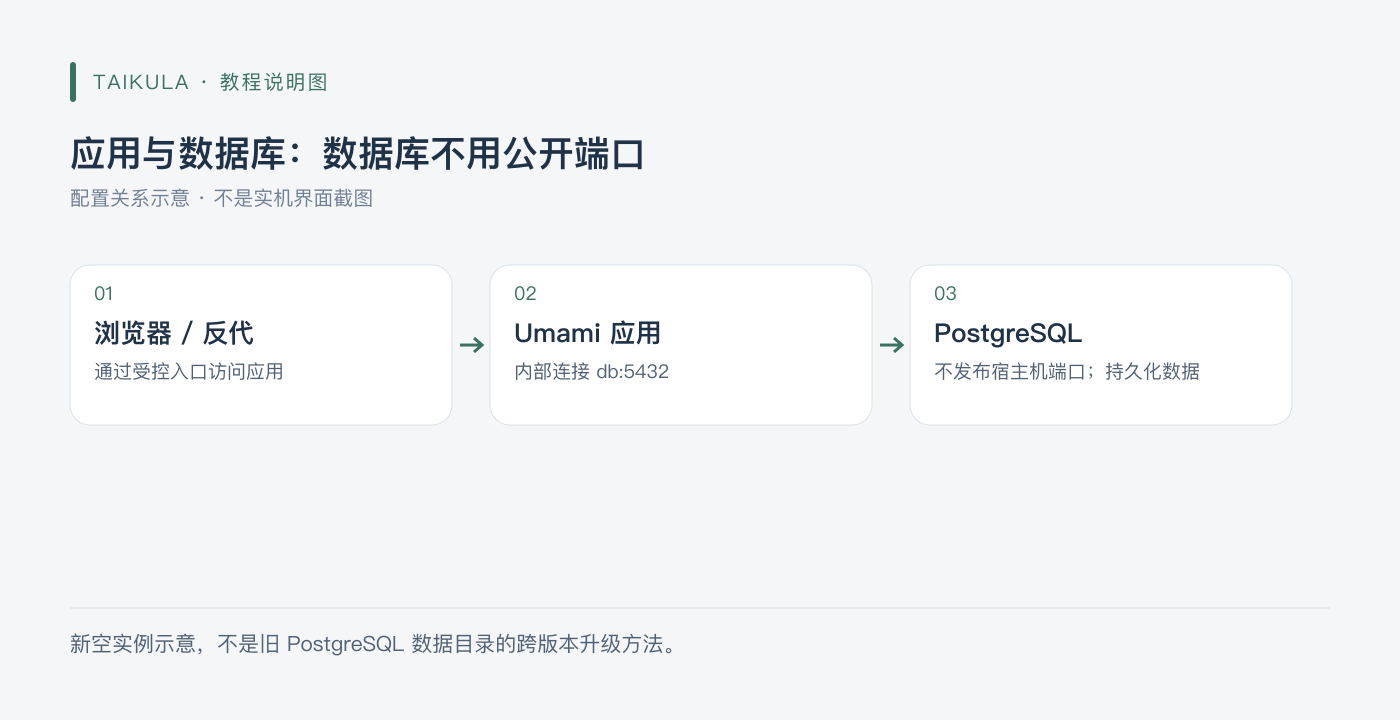
Illustration: Application and database: the database does not need a public port
services:
  umami:
    image: ghcr.io/umami-software/umami:latest
    restart: unless-stopped
    ports:
      - "127.0.0.1:3000:3000"
    environment:
      DATABASE_URL: "postgresql://umami:${POSTGRES_PASSWORD:?set POSTGRES_PASSWORD}@db:5432/umami"
      APP_SECRET: "${UMAMI_APP_SECRET:?set UMAMI_APP_SECRET}"
      TWO_FACTOR_ENCRYPTION_KEY: "${UMAMI_2FA_KEY:?set UMAMI_2FA_KEY}"
    depends_on:
      db:
        condition: service_healthy
    init: true
  db:
    image: postgres:15-alpine
    restart: unless-stopped
    environment:
      POSTGRES_DB: umami
      POSTGRES_USER: umami
      POSTGRES_PASSWORD: "${POSTGRES_PASSWORD:?set POSTGRES_PASSWORD}"
    volumes:
      - umami-db-data:/var/lib/postgresql/data
    healthcheck:
      test: ["CMD-SHELL", "pg_isready -U $${POSTGRES_USER} -d $${POSTGRES_DB}"]
      interval: 5s
      timeout: 5s
      retries: 5
volumes:
  umami-db-data:
If the password is used in a connection URI, choose URI-safe high-strength random characters, or properly encode special characters. The 2FA encryption key should be generated as a 64-character hexadecimal value according to project requirements; once saved, do not rotate it arbitrarily. The initialization method should be based on the current project; do not manually import fixed SQL files from mismatched sources or versions. PostgreSQL major version changes must undergo an independent migration; you cannot directly let the new version open the old data directory.
Reference: Official Compose. Not deployed on a real machine.
WebSSH
Historical configuration, not yet retested on a real machine against the current image. For image tags, application configuration, volume paths, and first-time initialization, refer to the maintainer's current documentation; the following cannot be treated as a verified new deployment solution.
services:
  webssh:
    container_name: webssh
    restart: 'no'
    ports:
    - 127.0.0.1:5032:5032
    environment:
    - PUID=0
    - PGID=0
    - TZ=Asia/Shanghai
    image: jrohy/webssh
Memos
Historical configuration, not yet retested on a real machine against the current image. For image tags, application configuration, volume paths, and first-time initialization, refer to the maintainer's current documentation; the following cannot be treated as a verified new deployment solution.
services:
  memos:
    container_name: memos
    restart: always
    environment:
    - TZ=Asia/Shanghai
    ports:
    - 127.0.0.1:5230:5230
    volumes:
    - ./memos/:/var/opt/memos
    image: neosmemo/memos:latest
Chatgpt-web
Historical configuration, not yet retested on a real machine against the current image. For image tags, application configuration, volume paths, and first-time initialization, refer to the maintainer's current documentation; the following cannot be treated as a verified new deployment solution.
services:
  chatgpt-web:
    container_name: chatgpt
    restart: always
    image: yidadaa/chatgpt-next-web
    ports:
    - 127.0.0.1:3355:3000
    environment:
    - TZ=Asia/Shanghai
    - OPENAI_API_KEY=${OPENAI_API_KEY:?set OPENAI_API_KEY in a private .env file}
    - CODE=${CODE:?set CODE in a private .env file}
    - BASE_URL=https://api.openai.com
Traccar location tracking
Historical configuration, not yet retested on a real machine against the current image. For image tags, application configuration, volume paths, and first-time initialization, refer to the maintainer's current documentation; the following cannot be treated as a verified new deployment solution.
Export the default traccar.xml file
docker run \
 --rm \
 --entrypoint cat \
 traccar/traccar:latest \
 /opt/traccar/conf/traccar.xml > ./traccar/traccar.xml
services:
  traccar:
    container_name: traccar
    restart: always
    environment:
    - TZ=Asia/Shanghai
    ports:
    - 127.0.0.1:3697:8082
    - 5000-5150:5000-5150
    - 5000-5150:5000-5150/udp
    volumes:
    - ./traccar/data:/opt/traccar/data:rw
    - ./traccar/logs:/opt/traccar/logs:rw
    - ./traccar/traccar.xml:/opt/traccar/conf/traccar.xml:ro
    image: traccar/traccar:latest
Reverse proxy server Traefik
In addition to missing YAML quotation marks, the original paragraph also only had container configuration, with no entry point, routing, certificate, or access control configuration, so it cannot serve as a complete HTTPS reverse proxy tutorial. It also directly mounted the Docker socket, and the permissions need to be evaluated separately.
For current deployment, choose the matching version and configuration method from the official Traefik guide. First verify entryPoints, providers, TLS, and routing in a test environment, then connect the real domain. Keep the DNS provider API key only in your own private configuration; do not paste it into public articles. This article no longer retains the incomplete and misleading old stack.
Reader
Historical configuration, not yet retested on a real machine against the current image. For image tags, application configuration, volume paths, and first-time initialization, refer to the maintainer's current documentation; the following cannot be treated as a verified new deployment solution.
services:
  reader:
    restart: always
    container_name: reader
    environment:
    - SPRING_PROFILES_ACTIVE=prod
    - READER_APP_SECURE=true
    - READER_APP_SECUREKEY=282828
    - READER_APP_INVITECODE=33655
    - TZ=Asia/Shanghai
    volumes:
    - ./reader/log:/log
    - ./reader/storage:/storage
    ports:
    - 127.0.0.1:8769:8080
    image: hectorqin/reader
Draw
Historical configuration, not yet retested on a real machine against the current image. For image tags, application configuration, volume paths, and first-time initialization, refer to the maintainer's current documentation; the following cannot be treated as a verified new deployment solution.
services:
  drawio:
    container_name: draw
    ports:
    - 127.0.0.1:8322:8080
    environment:
    - TZ=Asia/Shanghai
    restart: always
    image: jgraph/drawio
RSS subscription FreshRSS
Historical configuration, not yet retested on a real machine against the current image. For image tags, application configuration, volume paths, and first-time initialization, refer to the maintainer's current documentation; the following cannot be treated as a verified new deployment solution.
services:
  freshrss:
    container_name: freshrss
    environment:
    - CRON_MIN=*/45
    - TZ=Asia/Shanghai
    ports:
    - 127.0.0.1:5655:80
    volumes:
    - ./freshrss:/var/www/html/data
    image: freshrss/freshrss
ESP32HOME
Historical configuration, not yet retested on a real machine against the current image. For image tags, application configuration, volume paths, and first-time initialization, refer to the maintainer's current documentation; the following cannot be treated as a verified new deployment solution.
services:
  esphome:
    container_name: esphome
    ports:
    - 127.0.0.1:6052:6052
    environment:
    - http_proxy=http://10.0.0.5:7890
    - https_proxy=http://10.0.0.5:7890
    - no_proxy=localhost,10.0.0.5,10.0.0.1,192.168.1.1,127.0.0.1,.local,localhost
    image: esphome/esphome
Hand-drawn whiteboard
Historical configuration, not yet retested on a real machine against the current image. For image tags, application configuration, volume paths, and first-time initialization, refer to the maintainer's current documentation; the following cannot be treated as a verified new deployment solution.
services:
  excalidraw:
    container_name: excalidraw
    ports:
    - 127.0.0.1:8099:80
    environment:
    - TZ=Asia/Shanghai
    volumes:
    - ./excalidraw:/app/web
    restart: always
    image: excalidraw/excalidraw
Nginx+PHP
PHP 5.6, 7.3, and 8.0 were once used to run different sites side by side; these branches are no longer within the current support scope. The idea that "different sites can use different PHP-FPM" is retained, but new deployment lists for these old versions are no longer provided.
For new applications, first choose a still-supported PHP version with compatible dependencies, then configure Nginx's FastCGI upstream, site directory, and permissions. Migrating an old site requires checking extensions, syntax, and database compatibility in a test environment; upgrading is not accomplished just by changing the image tag. Reference: PHP Support Timeline.
phpmyadmin
Historical configuration, not yet retested on a real machine against the current image. For image tags, application configuration, volume paths, and first-time initialization, refer to the maintainer's current documentation; the following cannot be treated as a verified new deployment solution.
# 任意服务器
 docker run --name phpmyadmin -d -e PMA_ARBITRARY=1 -p 18080:80 phpmyadmin
 # 指定服务器及端口
 docker run --name phpmyadmin -d -e PMA_HOST=127.0.0.1 -e PMA_PORT=3306 -p 18080:80 phpmyadmin
MySQL
Historical configuration, not yet retested on a real machine against the current image. For image tags, application configuration, volume paths, and first-time initialization, refer to the maintainer's current documentation; the following cannot be treated as a verified new deployment solution.
services:
  mysql:
    container_name: mysql
    restart: always
    ports:
    - 127.0.0.1:3306:3306
    volumes:
    - ./mysql/data:/var/lib/mysql
    environment:
    - MYSQL_ROOT_PASSWORD=${MYSQL_ROOT_PASSWORD:?set MYSQL_ROOT_PASSWORD in a private .env file}
    - TZ=Asia/Shanghai
    image: mysql
Linux command reference
Historical configuration, not yet retested on a real machine against the current image. For image tags, application configuration, volume paths, and first-time initialization, refer to the maintainer's current documentation; the following cannot be treated as a verified new deployment solution.
services:
  web:
    image: stilleshan/linux-command
    container_name: linux-command
    ports:
    - 127.0.0.1:7326:80
    restart: always
docker-proxy
The old configuration exposed an unauthenticated 2375 and allowed a large number of write operations, which is too risky and is no longer retained as a deployment method to copy. The Docker API and socket can grant host-level privileges, and adding :ro to the socket mount does not make the API read-only.
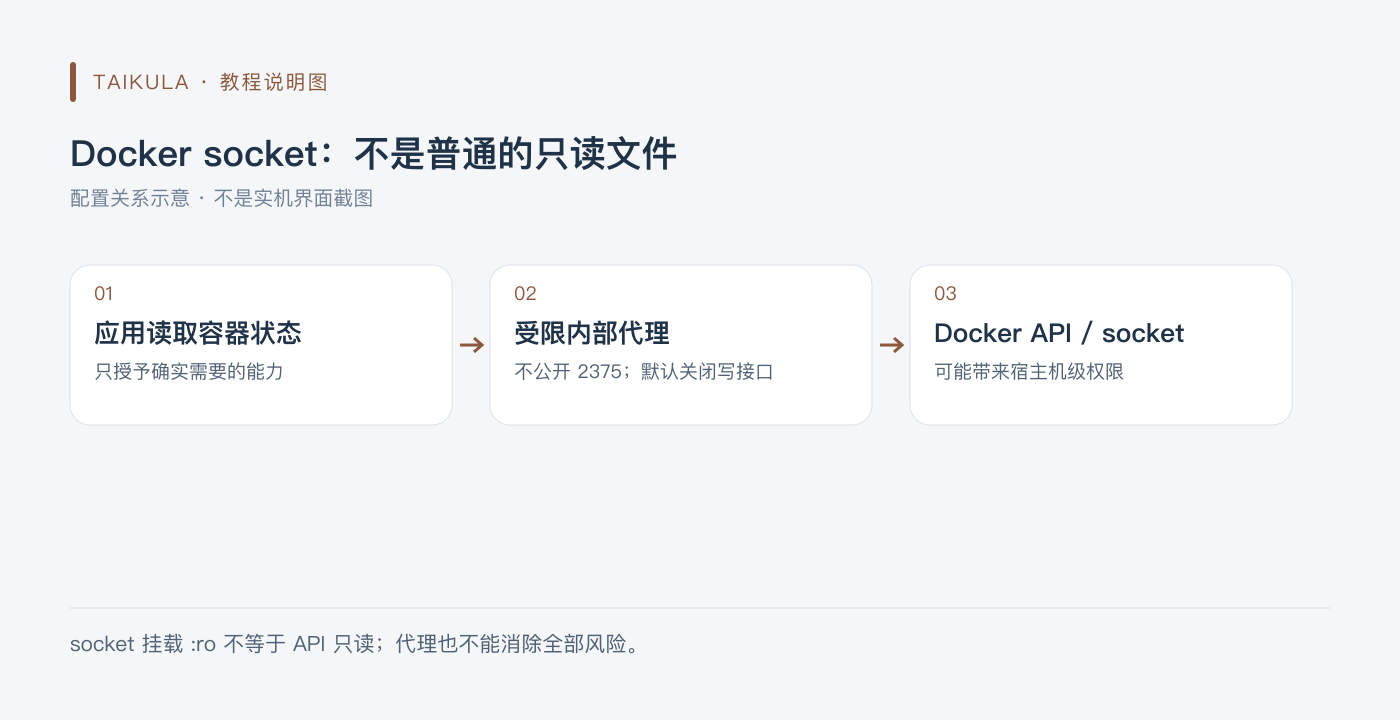
Illustration: Docker socket: not an ordinary read-only file
When container status really must be read, a restricted socket proxy can be evaluated: connect only to a dedicated internal network, do not expose 2375, disable POST by default, and open only the read endpoints that are actually needed. This is still a sensitive interface, not a universal boundary for security isolation. Reference: docker-socket-proxy project. Specific integrations need to be reviewed by the caller; this article does not provide a full-privilege configuration.
File courier
Historical configuration, not yet retested on a real machine against the current image. For image tags, application configuration, volume paths, and first-time initialization, refer to the maintainer's current documentation; the following cannot be treated as a verified new deployment solution.
services:
  filecodebox:
    container_name: filecodebox
    restart: always
    ports:
    - 127.0.0.1:12345:12345
    volumes:
    - ./FileCodeBox/:/app/data
    image: lanol/filecodebox:latest
MQTT
Historical configuration, not yet retested on a real machine against the current image. For image tags, application configuration, volume paths, and first-time initialization, refer to the maintainer's current documentation; the following cannot be treated as a verified new deployment solution.
Compose is only the container structure; it does not include complete authentication, TLS, routing, or business configuration. Before initialization and access control are complete, do not expose the entry point to untrusted networks.
services:
  eclipse-mosquitto:
    container_name: MQTT
    restart: always
    ports:
    - 127.0.0.1:1883:1883
    - 127.0.0.1:9001:9001
    volumes:
    - ./mqtt/conf:/mosquitto/config
    - ./mqtt/data:/mosquitto/data
    - ./mqtt/log:/mosquitto/log
    image: eclipse-mosquitto
Speed test speedtest
Historical configuration, not yet retested on a real machine against the current image. For image tags, application configuration, volume paths, and first-time initialization, refer to the maintainer's current documentation; the following cannot be treated as a verified new deployment solution.
services:
  speedtest:
    container_name: speedtest
    restart: always
    ports:
    - 127.0.0.1:12345:80
    image: adolfintel/speedtest
Subscription conversion
Historical configuration, not yet retested on a real machine against the current image. For image tags, application configuration, volume paths, and first-time initialization, refer to the maintainer's current documentation; the following cannot be treated as a verified new deployment solution.
services:
  subweb:
    container_name: subweb
    restart: always
    ports:
    - 127.0.0.1:58080:80
    image: careywong/subweb:latest
  subconverter:
    container_name: sub
    restart: always
    ports:
    - 127.0.0.1:25500:25500
    image: tindy2013/subconverter:latest
Docker command to stack conversion
Mount paths with special characters should be quoted; the images and page functions below are still historical configurations not yet retested on actual machines. Compose generated by conversion tools must also be reviewed yourself for permissions, volumes, ports, and credentials; it cannot be treated as a secure deployment solution just because it has been converted.
services:
  composerize:
    image: alcapone1933/composerize
    restart: unless-stopped
    ports:
      - "127.0.0.1:9080:80"
    environment:
      TZ: Asia/Shanghai
    volumes:
      - ./composerize:/var/www
Docker update notification
Historical configuration, not yet retested on a real machine against the current image. For image tags, application configuration, volume paths, and first-time initialization, refer to the maintainer's current documentation; the following cannot be treated as a verified new deployment solution.
This item involves host networking, devices, or high-privilege mounts. Evaluate it only in a necessary and trusted environment; do not treat the container as absolutely isolated; Docker socket permissions are especially sensitive.
services:
  diun:
    container_name: diun
    restart: always
    environment:
    - TZ=Asia/Shanghai
    - LOG_LEVEL=info
    - LOG_JSON=false
    - DIUN_PROVIDERS_DOCKER=true
    - DIUN_PROVIDERS_FILE_FILENAME=/custom-images.yml
    volumes:
    - ./diun:/data
    - ./diun/custom-images.yml:/custom-images.yml:ro
    - ./diun/diun.yml:/diun.yml:ro
    - /var/run/docker.sock:/var/run/docker.sock
    image: crazymax/diun:latest
Dashboard homepage
Homepage and Diun are different projects; when deploying, you should use Homepage's own image and configure the allowed access Host:
services:
  homepage:
    image: ghcr.io/gethomepage/homepage:latest
    restart: unless-stopped
    ports:
      - "127.0.0.1:3000:3000"
    environment:
      HOMEPAGE_ALLOWED_HOSTS: "localhost:3000,127.0.0.1:3000"
    volumes:
      - ./config:/app/config
When accessing via domain, change the allowed list to the actual domain. This minimal example does not connect to the Docker socket; if container status integration is needed, evaluate access permissions separately. Reference: Official Docker instructions. The configuration has been corrected according to the documentation and has not been run on a real machine.
trilium notes
nriver/trilium-cn is a third-party Chinese image. The current project is maintained by TriliumNext/Trilium, and the old image cannot be conflated with the current official release.
For new deployments, follow the official Docker guide to choose a verified version of triliumnext/trilium, and persist /home/node/trilium-data. Verify the server and client sync versions before upgrading; do not just switch to latest to open an existing note database. Migrating an old database requires separate backup and verification, and this article does not rewrite it as an operation that has already been completed.
FileBrowser File Management
Historical configuration, not yet retested on a real machine against the current image. For image tags, application configuration, volume paths, and first-time initialization, refer to the maintainer's current documentation; the following cannot be treated as a verified new deployment solution.
services:
  filebrowser:
    container_name: filebrowser
    ports:
    - 127.0.0.1:9696:80
    environment:
    - TZ=Asia/Shanghai
    - PUID=0
    - PGID=0
    volumes:
    - .:/Disk
    - ./filebrowser/database.db:/database.db
    - ./filebrowser/filebrowser.json:/.filebrowser.json
    - ./filebrowser/cache:/cache
    image: filebrowser/filebrowser
VSCode
Historical configuration, not yet retested on a real machine against the current image. For image tags, application configuration, volume paths, and first-time initialization, refer to the maintainer's current documentation; the following cannot be treated as a verified new deployment solution.
services:
  code-server:
    container_name: vscode
    environment:
    - TZ=Asia/Shanghai
    - PUID=0
    - PGID=0
    - PASSWORD=${PASSWORD:?set PASSWORD in a private .env file}
    - DEFAULT_WORKSPACE=/000
    ports:
    - 127.0.0.1:5797:8443
    volumes:
    - ./vscode:/config
    - .:/000
    restart: always
    image: linuxserver/code-server
Baidu Mind Map
Historical configuration, not yet retested on a real machine against the current image. For image tags, application configuration, volume paths, and first-time initialization, refer to the maintainer's current documentation; the following cannot be treated as a verified new deployment solution.
services:
  kityminder:
    container_name: mind
    restart: always
    ports:
    - 127.0.0.1:2333:80
    environment:
    - TZ=Asia/Shanghai
    volumes:
    - ./mind:/data
    image: xinyewdz/kityminder
RSSPush
Historical configuration, not yet retested on a real machine against the current image. For image tags, application configuration, volume paths, and first-time initialization, refer to the maintainer's current documentation; the following cannot be treated as a verified new deployment solution.
services:
  rsspush:
    container_name: rsspush
    ports:
    - 127.0.0.1:6863:8000
    volumes:
    - ./rsspush:/rsspush/api/data
    environment:
    - TZ=Asia/Shanghai
    - RSS_BASE=http://10.0.0.9:8556
    - ADMIN_KEY=123456
    image: easychen/rsspush
OCR Text Recognition
Historical configuration, not yet retested on a real machine against the current image. For image tags, application configuration, volume paths, and first-time initialization, refer to the maintainer's current documentation; the following cannot be treated as a verified new deployment solution.
services:
  trwebocr:
    ports:
    - 127.0.0.1:18089:8089
    restart: always
    container_name: trwebocr
    image: mmmz/trwebocr
Photo Album (MT Photo)
The old image name mtphotos/mt-photos/photosync is incorrect; the current project publishes mtphotos/mt-photos. Below only the container structure is described; handle authorization and album import according to the project requirements:
services:
  mt-photos:
    image: mtphotos/mt-photos:latest
    restart: unless-stopped
    ports:
      - "127.0.0.1:8063:8063"
    environment:
      TZ: Asia/Shanghai
    volumes:
      - ./mt_photos/config:/config
      - ./mt_photos/upload:/upload
Do not add CIFS volumes that are not used by the service, and do not write shared account passwords into public configurations. Existing photo directories and upload directories must be clearly distinguished; before mounting external photo albums, check the current documentation first. Reference: Project Release Image. Not deployed on an actual machine.
ADGuard Home
image: run in the old configuration is not a valid project image; it should be adguard/adguardhome. The DNS service needs to make designated LAN devices reachable, so port 53 cannot be bound only to the loopback address and then claim that the entire LAN can use it.
For new deployments, follow the official Docker guide to set up the two persistent directories work and conf and the required ports. First check whether port 53 on the host is occupied by an existing DNS service. Port 3000 is usually used for initial setup; after setup, the management port depends on the actual choice. Do not stop the system DNS without looking at the existing network, and do not expose DNS and the management panel to the public internet without protection. This article does not provide a set of port mappings claimed to apply to all networks.
SmartDNS
Historical configuration, not yet retested on a real machine against the current image. For image tags, application configuration, volume paths, and first-time initialization, refer to the maintainer's current documentation; the following cannot be treated as a verified new deployment solution.
This item involves host networking, devices, or high-privilege mounts. Evaluate it only in a necessary and trusted environment; do not treat the container as absolutely isolated; Docker socket permissions are especially sensitive.
services:
  smartdns:
    network_mode: host
    hostname: smartdns
    container_name: smartdns
    restart: always
    environment:
    - TZ=Asia/Shanghai
    volumes:
    - ./smartdns:/smartdns
    image: ghostry/smartdns
xTeVe
Historical configuration, not yet retested on a real machine against the current image. For image tags, application configuration, volume paths, and first-time initialization, refer to the maintainer's current documentation; the following cannot be treated as a verified new deployment solution.
services:
  xteve:
    container_name: xteve
    restart: always
    hostname: xteve
    ports:
    - 127.0.0.1:34400:34400
    logging:
      options: max-size=10m,max-file=3
    environment:
    - TZ=Asia/Shanghai
    volumes:
    - ./xteve/xteve:/root/.xteve:rw
    - ./xteve/config:/config:rw
    - ./xteve/tmp:/tmp/xteve:rw
    - ./xteve/tvheadend/data:/TVH
    image: alturismo/xteve
SiYuan Note (siyuan)
Historical configuration, not yet retested on a real machine against the current image. For image tags, application configuration, volume paths, and first-time initialization, refer to the maintainer's current documentation; the following cannot be treated as a verified new deployment solution.
services:
  siyuan:
    container_name: siyuan
    restart: always
    volumes:
    - ./siyuan:/siyuan
    ports:
    - 127.0.0.1:6806:6806
    image: b3log/siyuan
Web Monitoring (uptime-kuma)
Historical configuration, not yet retested on a real machine against the current image. For image tags, application configuration, volume paths, and first-time initialization, refer to the maintainer's current documentation; the following cannot be treated as a verified new deployment solution.
services:
  uptime-kuma:
    restart: always
    environment:
    - TZ=Asia/Shanghai
    ports:
    - 127.0.0.1:3001:3001
    volumes:
    - ./uptime-kuma/data:/app/data
    container_name: uptime-kuma
    image: louislam/uptime-kuma:latest
Media Robot (movierobot)
Historical configuration, not yet retested on a real machine against the current image. For image tags, application configuration, volume paths, and first-time initialization, refer to the maintainer's current documentation; the following cannot be treated as a verified new deployment solution.
services:
  movie-robot:
    restart: always
    container_name: movie-robot
    ports:
    - 127.0.0.1:1329:1329
    volumes:
    - ./movie-robot:/data
    - /path/to/media:/media
    environment:
    - LICENSE_KEY=xxxxxxxxxx
    image: yipengfei/movie-robot
overseerr
Third-party Overseerr images and the current official release must be verified separately. The current related project has shifted to Seerr, with the official image released as ghcr.io/seerr-team/seerr or seerr/seerr; the old container name and the new project cannot be unconditionally interchanged.
For new deployments, refer to the Seerr Getting Started documentation; for old Overseerr instances, first check the corresponding migration instructions, back up the configuration and database, then decide whether to migrate. This only introduces the deployment entry point; no media service migration was actually performed.
Docker visual management (Portainer)
The current main management entry point for Portainer CE is HTTPS 9443. The following entry points only listen on the local machine; remote use requires secure forwarding or a verified reverse proxy:
services:
  portainer:
    image: portainer/portainer-ce:latest
    restart: unless-stopped
    ports:
      - "127.0.0.1:9443:9443"
    volumes:
      - /var/run/docker.sock:/var/run/docker.sock
      - portainer_data:/data
volumes:
  portainer_data:
Portainer manages host containers through the Docker socket and has high privileges; complete the administrator initialization first, and do not expose an unmanaged entry point to the public. Certificates must also be configured according to the actual access domain and trust method; this is not a demand that readers ignore all certificate errors. Reference: Official CE installation. Not deployed on real hardware.
RSS generation (RSSHub)
Historical configuration, not yet retested on a real machine against the current image. For image tags, application configuration, volume paths, and first-time initialization, refer to the maintainer's current documentation; the following cannot be treated as a verified new deployment solution.
services:
  rsshub:
    restart: always
    container_name: rsshub
    ports:
    - 127.0.0.1:8556:1200
    image: diygod/rsshub
flexget
Historical configuration, not yet retested on a real machine against the current image. For image tags, application configuration, volume paths, and first-time initialization, refer to the maintainer's current documentation; the following cannot be treated as a verified new deployment solution.
services:
  flexget:
    image: madwind/flexget
    container_name: flexget
    environment:
      FG_WEBUI_PASSWD: ${FG_WEBUI_PASSWD:?set FG_WEBUI_PASSWD in a private .env file}
      FG_LOG_LEVEL: INFO
      TZ: Asia/Shanghai
      PUID: 1000
      PGID: 1000
    volumes:
    - ./flexget/config:/config
    - ./flexget/downloads:/downloads
    ports:
    - 127.0.0.1:8385:3539
    restart: always
bark
Historical configuration, not yet retested on a real machine against the current image. For image tags, application configuration, volume paths, and first-time initialization, refer to the maintainer's current documentation; the following cannot be treated as a verified new deployment solution.
services:
  bark-server:
    restart: always
    environment:
    - TZ=Asia/Shanghai
    container_name: bark
    ports:
    - 127.0.0.1:8383:8080
    volumes:
    - ./bark/data:/data
    image: finab/bark-server
Password management (Vaultwarden/Bitwarden)
Historical configuration, not yet retested on a real machine against the current image. For image tags, application configuration, volume paths, and first-time initialization, refer to the maintainer's current documentation; the following cannot be treated as a verified new deployment solution.
Compose is only the container structure; it does not include complete authentication, TLS, routing, or business configuration. Before initialization and access control are complete, do not expose the entry point to untrusted networks.
services:
  server:
    restart: always
    container_name: vaultwarden
    environment:
    - TZ=Asia/Shanghai
    volumes:
    - ./Bitwarden/data/:/data/
    ports:
    - 127.0.0.1:12256:80
    image: vaultwarden/server
Docker container auto-update (Watchtower)
Watchtower can automatically replace running images. As of this verification, the original project repository has been archived and is no longer the default recommendation for new deployments. This is especially true for databases, notes, password management, and core services; they are not suitable for automatic updates without reading the release notes.

Explanatory image: container updates: after notification, back up before acting
A more reliable process is to receive an update notification, verify the changes, back up and test recovery, then manually update during a maintenance window, check the service and data, and retain a viable rollback option. A rollback image cannot necessarily roll back a data format that has already been migrated. Diun can be used for update notifications, but a notification itself does not mean the update is complete.
References: Watchtower repository status, Diun. What was removed is the automatic update recommendation in the article; no running containers were changed.
URL bookmarks (Shaarli)
Historical configuration, not yet retested on a real machine against the current image. For image tags, application configuration, volume paths, and first-time initialization, refer to the maintainer's current documentation; the following cannot be treated as a verified new deployment solution.
services:
  shaarli:
    container_name: Shaarli
    restart: always
    ports:
    - 127.0.0.1:8561:80
    volumes:
    - ./shaarli:/var/www/shaarli/data
    image: shaarli/shaarli
Smart home (HASS)
Historical configuration, not yet retested on a real machine against the current image. For image tags, application configuration, volume paths, and first-time initialization, refer to the maintainer's current documentation; the following cannot be treated as a verified new deployment solution.
This item involves host networking, devices, or high-privilege mounts. Evaluate it only in a necessary and trusted environment; do not treat the container as absolutely isolated; Docker socket permissions are especially sensitive.
services:
  home-assistant:
    restart: always
    container_name: hass
    privileged: true
    network_mode: host
    environment:
    - TZ=Asia/Shanghai
    volumes:
    - ./hass:/config
    - /run/dbus:/run/dbus
    - /var/run/dbus:/var/run/dbus
    - /dev:/dev
    - /var/run/docker.sock:/var/run/docker.sock
    - /dev/bus/usb:/dev/bus/usb
    image: homeassistant/home-assistant:latest
Wiz Notes (Wiz)
Historical configuration, not yet retested on a real machine against the current image. For image tags, application configuration, volume paths, and first-time initialization, refer to the maintainer's current documentation; the following cannot be treated as a verified new deployment solution.
services:
  wizserver:
    container_name: wiz
    volumes:
    - ./wiz/data:/wiz/storage
    - /etc/localtime:/etc/localtime
    ports:
    - 127.0.0.1:8357:80
    - 127.0.0.1:9269:9269/udp
    image: wiznote/wizserver
Default administrator account: admin@wiz.cn, password: 123456
Bastion host (next-terminal)
Historical configuration, not yet retested on a real machine against the current image. For image tags, application configuration, volume paths, and first-time initialization, refer to the maintainer's current documentation; the following cannot be treated as a verified new deployment solution.
Compose is only the container structure; it does not include complete authentication, TLS, routing, or business configuration. Before initialization and access control are complete, do not expose the entry point to untrusted networks.
services:
  guacd:
    container_name: guacd
    image: dushixiang/guacd:latest
    volumes:
    - ./next-terminal/data:/usr/local/next-terminal/data
    restart: always
  next-terminal:
    container_name: next-terminal
    image: dushixiang/next-terminal:latest
    environment:
      DB: sqlite
      GUACD_HOSTNAME: guacd
      GUACD_PORT: 4822
    ports:
    - 127.0.0.1:8068:8088
    volumes:
    - /etc/localtime:/etc/localtime
    - ./next-terminal/data:/usr/local/next-terminal/data
    restart: always
Photo album (photoprism)
Historical configuration, not yet retested on a real machine against the current image. For image tags, application configuration, volume paths, and first-time initialization, refer to the maintainer's current documentation; the following cannot be treated as a verified new deployment solution.
services:
  photoprism:
    container_name: photoprism
    ports:
    - 127.0.0.1:8568:2342
    environment:
    - PHOTOPRISM_UPLOAD_NSFW=false
    - PHOTOPRISM_ADMIN_PASSWORD=${PHOTOPRISM_ADMIN_PASSWORD:?set PHOTOPRISM_ADMIN_PASSWORD in a private .env file}
    volumes:
    - ./photoprism:/photoprism/storage
    - ./Pictures/Pictures:/photoprism/originals
    - ./Pictures/Example:/photoprism/originals/Example
    image: photoprism/photoprism
node-red
Historical configuration, not yet retested on a real machine against the current image. For image tags, application configuration, volume paths, and first-time initialization, refer to the maintainer's current documentation; the following cannot be treated as a verified new deployment solution.
services:
  node-red:
    container_name: nodered
    restart: always
    ports:
    - 127.0.0.1:1880:1880
    environment:
    - TZ=Asia/Shanghai
    volumes:
    - ./nodered/data:/data
    image: nodered/node-red
PLEX monitor (Tautulli)
Tautulli should use the image provided by the official project, not argparse:
services:
  tautulli:
    image: tautulli/tautulli:latest
    restart: unless-stopped
    ports:
      - "127.0.0.1:8181:8181"
    volumes:
      - ./tautulli/config:/config
    environment:
      TZ: Asia/Shanghai
During initialization, connect to your own Plex and properly protect the corresponding credentials. The statistics service does not need to be directly exposed to the public internet just because it can read playback data. Reference: official project. Not deployed on a real machine.
Personal navigation (onenav)
Historical configuration, not yet retested on a real machine against the current image. For image tags, application configuration, volume paths, and first-time initialization, refer to the maintainer's current documentation; the following cannot be treated as a verified new deployment solution.
services:
  onenav:
    container_name: onenav
    ports:
    - 127.0.0.1:8252:80
    environment:
    - USER=zsg
    - PASSWORD=${PASSWORD:?set PASSWORD in a private .env file}
    volumes:
    - ./onenav:/data/wwwroot/default/data
    image: helloz/onenav
Web clipping (wallabag)
Historical configuration, not yet retested on a real machine against the current image. For image tags, application configuration, volume paths, and first-time initialization, refer to the maintainer's current documentation; the following cannot be treated as a verified new deployment solution.
services:
  wallabag:
    container_name: wallabag
    restart: always
    volumes:
    - ./wallabag/data:/var/www/wallabag/data
    - ./wallabag/images:/var/www/wallabag/web/assets/images
    ports:
    - 127.0.0.1:5631:80
    environment:
    - SYMFONY__ENV__DOMAIN_NAME=https://wb.abc.com:8080
    image: wallabag/wallabag
TTRSS
wangqiru/ttrss once used a multi-container solution and PostgreSQL 13. It is a historical configuration for a specific project, not a general Compose from the official upstream; PostgreSQL 13 is no longer suitable as the default database for new deployments.
For new deployments, first verify the Tiny Tiny RSS upstream and the current installation instructions of the chosen image maintainer. Existing PostgreSQL data needs to be migrated according to a supported export/restore or upgrade process; you cannot directly mount the data directory from 13 onto any arbitrary new major version image. Database passwords should be generated yourself, and the initialization list must match the version used.
Maintenance and backup
Configuration files, database backups, and upload directories should be stored separately; update the service only after a test recovery. Do not run whole-disk cleanup, delete data volumes, or reset database commands to "fix" startup failures. References: Docker port publishing, restart policies, Compose version field.