The previous post covered what Kanbox can do today. This one is about how a share link turns into a saved item.
The obvious approach is to fetch the page, then read the title and cover image. But once you have the page, the real problems begin: sometimes the body is in the HTML, sometimes it's buried in a JSON blob, sometimes you get a login prompt, and sometimes the share URL only exists to open the original app.
Right now this code lives mainly in LinkResolver.swift and Parsers.swift. I'll use Xiaohongshu, Douban, Xiaoyuzhou, and GitHub as examples. This is about the current implementation — nothing here involves bypassing logins or access restrictions.
First, pull the link out of the share text
What you copy from another app is often not a clean URL but a chunk of text like this:
伊斯坦布尔的窗户有魔法!📷 我好像拍到了一扇扇通往...
https://xhslink.cn/o/2PMVMYCtPdE
来【小红书】围观这篇笔记!
The parser entry point first extracts HTTP or HTTPS links, and also handles bare domains with no protocol prefix. Extra Chinese periods, quotation marks, and parentheses after the link need to be stripped — otherwise they can get encoded into the address and you end up requesting a page that doesn't exist. But you can't just delete all parentheses: the URL itself may legitimately contain a pair, so only the extra one gets removed.
The clipboard differs too. Some apps write plain text, others write only a URL type. The current order is: first look for text containing a link, then check the URL and the system-detected web address. When there's share text, keep the whole thing if possible, because the words before the link can still supply a title.
Extracting that title doesn't require a network call. If the page never loads, at least you still know what you just saved; if the network result has a title, use that instead. The "come check out this post on [App]" trailing text doesn't become the title.
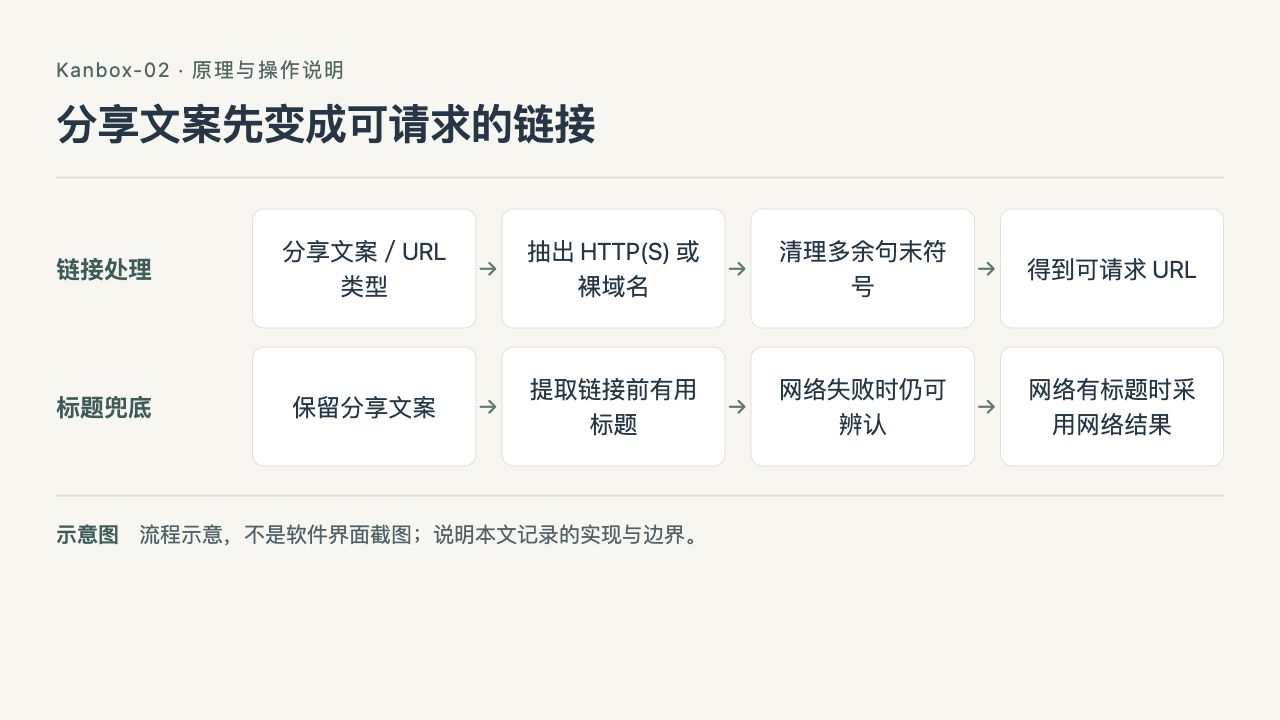
Kanbox-02 flow diagram: share text first becomes a requestable link
Clean up the extra punctuation first, but don't delete parentheses that are legitimately part of the URL. The share title serves as a local fallback; once the network returns a title, that takes over.
Fetch the page, then decide who handles it
Xiaohongshu short links and some share addresses redirect. After following redirects, the final domain picks the parser, and both the original and final addresses are kept.
Network requests and field extraction are separate. LinkResolver handles requests, supplementary data, and failure handling; platform parsers receive HTML and return a unified ParsedContent. That way, changing Xiaohongshu fields doesn't require touching the network layer, and you can feed a saved page to a parser for testing.
When an ordinary web page has no dedicated parser, the code reads structured data plus metadata like title, description, and cover image. Open Graph provides exactly this kind of preview info — but having it doesn't mean you have the full article.
For article pages, the code tries to extract the body: it looks for <article> first, strips navigation, footers, and scripts, then picks content blocks by text volume, punctuation, and link density. Some dynamic pages only expose the outer page structure, so the body has to be read after the page loads in an isolated, logged-out WebKit instance. This generic path is never applied to platforms that already have a dedicated parser.

Kanbox-02 flow diagram: the network layer fetches the page, the parser extracts fields
Requests, platform dispatch, and field extraction are separate. Dedicated platform parsers don't get the generic body extraction; ordinary pages read preview and structured data first, and only dynamic bodies go through the isolated, logged-out WebKit.
Four platforms, four approaches
| Source | Main data read today | Supplementary or fallback handling |
|---|---|---|
| Xiaohongshu | Note initial data in the page | When there's no note data, check for a login prompt; if needed, keep only the link |
| Douban | Public mobile subject page | Map the app share route to the subject page; for films, also fetch cast and crew |
| Xiaoyuzhou | __NEXT_DATA__ on the episode page | Then try PodcastEpisode data and page metadata |
| GitHub | Repo page preview and public REST API | Fetch repo info and README separately; on failure, keep whatever was already retrieved |
Xiaohongshu: beyond the cover, get the whole image set
That Istanbul photo set from the previous post had 11 images. Read only a cover field and you'd end up with just one saved.
The current parser prioritizes the note object in the page's initial data, pulling the title, author, body, topics, and an ordered image list from it. When deduplicating images, it preserves the original order rather than swapping in an unordered set.
The explicit fallback condition: if the page has window.__INITIAL_STATE__ but no note object can be found, don't keep going and treat the homepage logo as the note cover. What came back might be a login page, a page after the note was deleted, or just a page shell with no body. In that case, keep the link and leave a parsing note.
Only for the occasional page without that initial data does the code fall through to preview tags. Getting an image with the word "Xiaohongshu" on it is not enough to prove the note was parsed successfully.
Video is handled separately. The page may provide a media location, but whether it plays still has to be checked at use time; one expired address shouldn't take down the title and body you already saved.
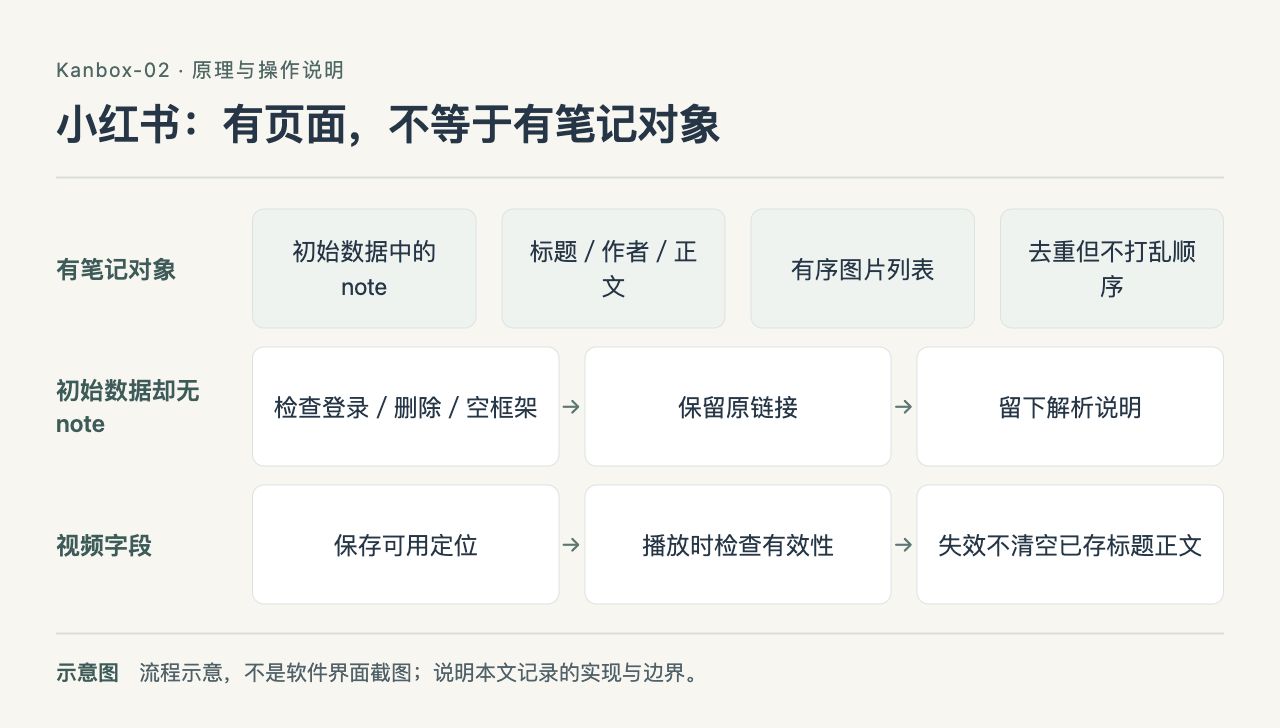
Kanbox-02 flow diagram: Xiaohongshu — having a page doesn't mean having a note object
The point is whether the note data exists, not whether there's an image on the page. The image list keeps its order; when the note object is missing, keep the link and a note — don't pass off the homepage logo as the cover.

Kanbox-02 screenshot: the 11-image browser for the Istanbul note
Open the "伊斯坦布尔的窗户有魔法!" saved item and the image viewer shows image 1 of 11, along with the dimensions and file size of this JPEG. It displays the original images from the note, not a separately made share card; only once the full set is retrieved do you get per-image browsing, saving, and sharing. The screenshot comes from a public link sample in the blog's dedicated simulator.
Douban: a share address isn't necessarily the info page
Take 3 Idiots as an example. What the app shares is:
https://www.douban.com/doubanapp/dispatch/movie/3793023?dt_dapp=1
This dispatch page mainly exists to redirect. The current code recognizes the fixed type and numeric ID, then requests Douban's own public mobile subject page:
https://m.douban.com/movie/subject/3793023/
The film title, synopsis, poster, rating, and basic info are read from the subject page. The cast and crew list isn't a ready-made block of text in the static page — it requires an extra call to the public API that the mobile page uses. If that call fails, the film info already read is kept.
Here you can't just take any address from the share link's parameters and request it directly. The current mapping is restricted to Douban domains, recognized routes, and numeric IDs. A removed or error page also can't be treated as film info just because it has a navigation image.
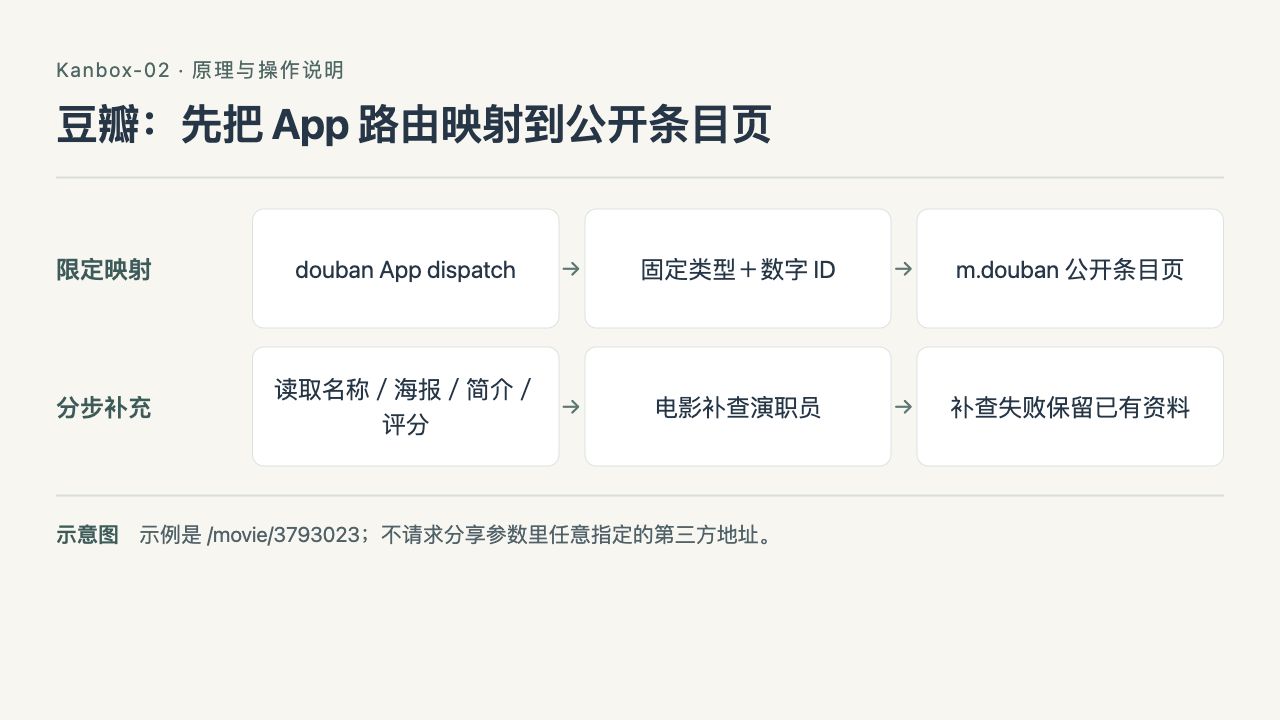
Kanbox-02 flow diagram: Douban — map the app route to the public subject page first
Only Douban domains, known routes, and numeric IDs are recognized. Save the subject info first, then fetch cast and crew; if the second request fails, don't wipe out the film info you already have.
Xiaoyuzhou: show notes and audio are saved separately
On a Xiaoyuzhou episode page, __NEXT_DATA__ is usually more complete than the page summary. The current code reads the title, shownotes, show name, cover, publish time, and the audio address the page provides from the episode object; when an episode ID is available, it also verifies it matches the episode being requested.
Paragraphs and lists in the shownotes are cleaned up into readable text rather than dumping raw HTML tags into the saved item. Without that data, the code tries PodcastEpisode structured data next, and falls back to page metadata last.
Audio goes in audioUrl, not videoUrl. Both might open in a player, but they shouldn't show up as the same media type in the saved list.
If the title and description were read but the audio wasn't, the episode can still be saved — just with a clear notice that the online playback address is missing. Having an audio address also doesn't mean it's been downloaded offline; playback may still need a network connection.

Kanbox-02 flow diagram: Xiaoyuzhou — show text and audio are two separate field groups
Verify identity by episode ID, read episode data first, then try structured data and page preview. Missing audio still lets you keep the episode, but it can't be shown as downloaded or stuffed into videoUrl.
GitHub: don't pass off the file list as the README
A repo page contains navigation, a file list, and a README container. Converting a big chunk of HTML straight to text won't necessarily give you a useful project description.
Kanbox first confirms the repo identity and page preview, then separately requests the repository info API and the README API. Public repos can be accessed anonymously. Repo info fills in the description, language, topics, license, and stats; the README is saved separately.
The response also has to be checked against the owner and repo name to avoid merging in a different project. The README has a length limit too, and truncation leaves a marker. If the API is rate-limited or the README can't be fetched, the existing repo preview isn't cleared.
This part currently targets repo root addresses. An issue, file page, or other GitHub path can't be treated directly as a repo root page.
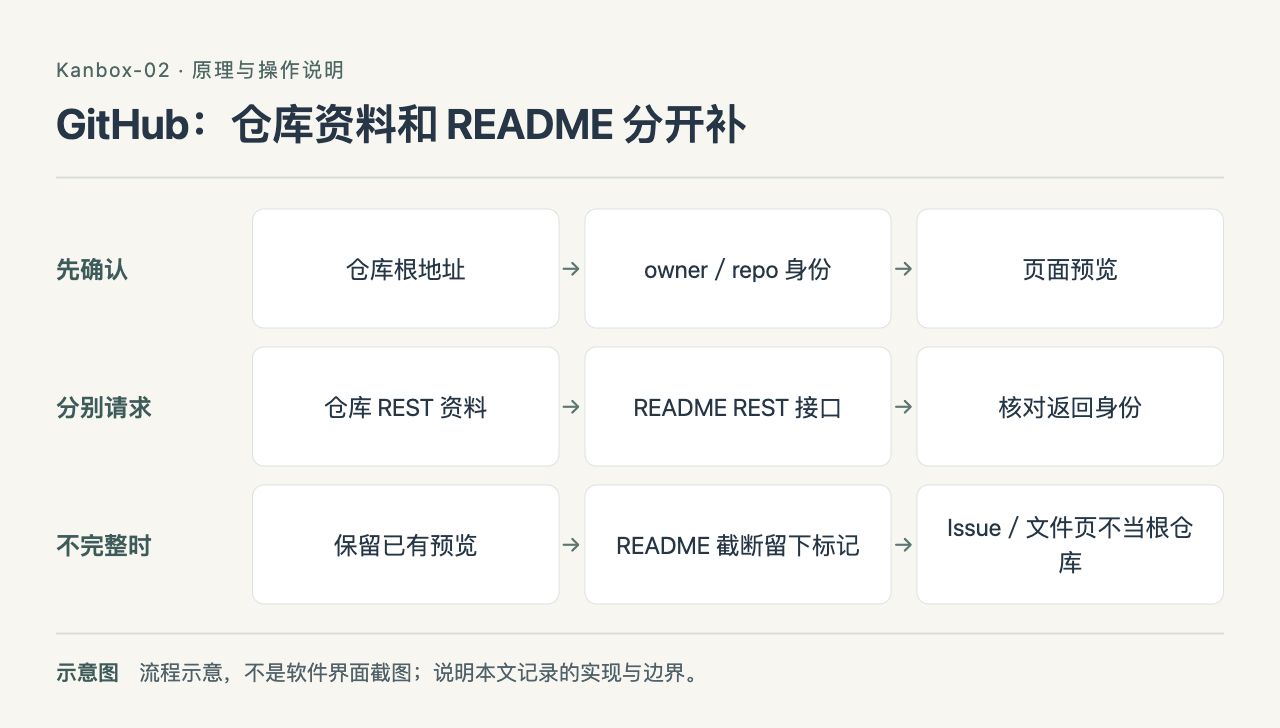
Kanbox-02 flow diagram: GitHub — repo info and README are fetched separately
Confirm the repo identity first, then fetch info and README separately. The response has to match the owner and repo name; when the API is rate-limited, the preview is still kept — no faking a README with the file list.
When parsing fails, how does the saved item survive?
The unified parse result has two fields, isResolved and note. The first says whether the parser got a usable result; the second records things like missing media or a login requirement. They have to be read together: isResolved = true can still mean only partial content was parsed, not that every field is complete.
When the network is down, a request times out, or the page is unreachable, the parsing layer returns a result containing only basic info like the link, along with the failure reason; if the share text had a title, that gets added too. The parsing stats in settings also distinguish partial results with a note from successful results without one.
HTTP errors have to be blocked first. A 403 or 404 page can also have a title and a full HTML body, but that doesn't mean you should save "Access Denied" as the article title and clear the failure flag.
A single page response reads at most 3 MiB; once the limit is hit, the transfer stops — it doesn't download the whole file first and then truncate. Request timeout is 20 seconds, resource timeout is 30 seconds; these limits apply to a single network request, and the whole supplementary-data process isn't guaranteed to finish within 20 seconds.
Parse failure and save failure also have to be kept separate. The system share extension writes results into the App Group's pending queue, one file per item, with atomic writes followed by a read-back to confirm. Once the main app becomes active, it writes to SwiftData, and only after the save is confirmed does it remove that item from the queue. If writing to the queue or the database fails, it still has to report an error — you can't show "saved" just because the parser returned a result.

Kanbox-02 flow diagram: parse result, queue write, and database save are confirmed separately
A parse failure can keep the link, but a failed save action still has to report an error. Only after SwiftData confirms the save is the corresponding pending file deleted — you can't show "saved" just because the network returned something.
Re-parsing without wiping out the user's edits
The detail page has a manual re-parse entry point. It re-requests the network rather than re-displaying the last failed result; it can also refresh expired media info for content that was already parsed.
But a retry can't just overwrite the whole saved item with a new result. The user may have changed the title, written a body, or edited again while waiting for the network to return.
The current approach: before the request, record the item ID, original link, and revision time; after it returns, re-read the item, confirm it hasn't been deleted or modified, then apply the parse fields that are allowed to update. The user's title, body, tags, and saved status are preserved. If the new result has no images, keep the old ones; if there's a new non-empty image list, update the image list.
Network failure means no write, and if the item changed while waiting, no write either. If the final save fails, restore the content from before this update, then prompt to retry.
Media addresses have expiration too. Some Instagram video addresses are signed, for example, so before playback or saving, the embed page for the same content is re-read; that's a different thing from re-parsing the whole saved item. The official HTML player, the stable original post address, and the actual video file can't all be treated as downloadable files just because they live in playback-related fields.

Kanbox-02 flow diagram: re-parsing checks the revision first, then updates allowed fields
After the request goes out, the user may have edited the content again. On return, re-read and compare identity, link, and revision time; if the conditions aren't met, don't write, and if the save fails, restore the content from before this update.
Which pages should the tests keep around?
The project already has page-sample parsing tests and mock network tests. The Xiaoyuzhou tests check shownotes, audio fields, and untrusted media domains; the GitHub tests check repo identity matching and README truncation; the network layer tests check redirects, the 3 MiB limit, a new request after a first failure, and that an HTTP error with HTML can't turn into a successful result.
These tests can check field extraction and code boundaries, but they can't guarantee the platform will still work after its next redesign. When you hit a dead link, you still have to look at whether the actual response is normal content, a login prompt, an empty page, or an error response. After changing a parser, you need to check both the old samples and the new real pages.

Kanbox-02 flow diagram: sample tests and real-page checks both need to be kept
Saving page samples makes field checks stable, and mock networks can cover errors and retries; but the platform's actual responses can still change, so new-page checks are needed. Passing tests is not written up as the platform being available forever.
For now, that's the approach: save as much as can be read, leave a note about what's missing, and give the user a retry entry point that doesn't destroy old content. Platform limits still exist, and this post documents the implementation as of October 2, 2026 — it doesn't treat the data structures inside pages as an API the platform promises to provide long-term.